
HOTSPOT
-
You have a Microsoft 365 E5 subscription.
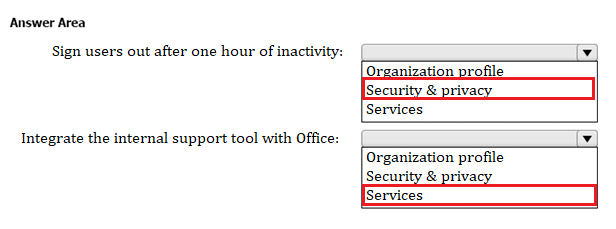
You need to configure the Org settings to meet the following requirements:
• Sign users out of Microsoft Office 365 web apps after one hour of inactivity.
• Integrate an internal support tool with Office.
Which settings should you configure for each requirement? To answer, select the appropriate options in the answer area.
NOTE: Each correct selection is worth one point.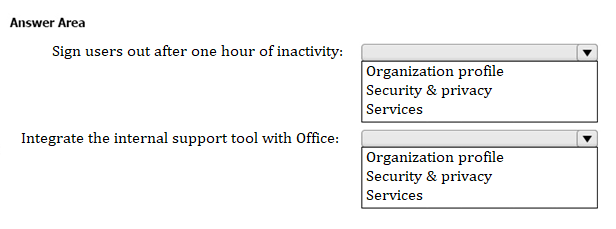
Correct Answer:
You have a Microsoft 365 subscription.
You add a domain named contoso.com.
When you attempt to verify the domain, you are prompted to send a verification email to admin@contoso.com.
You need to change the email address used to verify the domain.
What should you do?
Correct Answer:
B
🗳️
HOTSPOT
-
Your company uses Microsoft Defender for Endpoint. Microsoft Defender for Endpoint contains the device groups shown in the following table.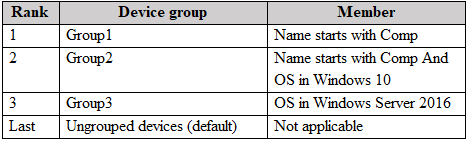
You onboard computers to Microsoft Defender for Endpoint as shown in the following table.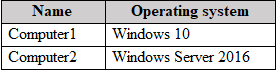
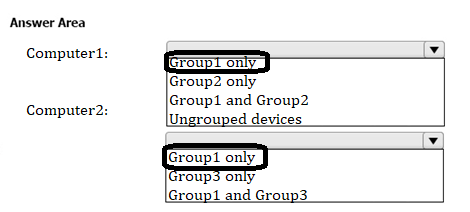
Of which groups are Computer1 and Computer2 members? To answer, select the appropriate options in the answer area.
NOTE: Each correct selection is worth one point.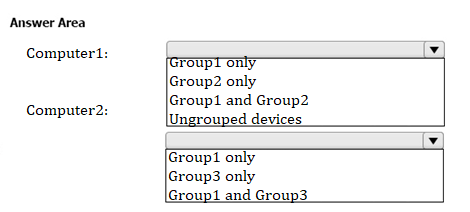
Correct Answer:
HOTSPOT
-
You have a Microsoft 365 E5 subscription that contains the users shown in the following table.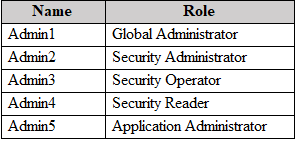
You are implementing Microsoft Defender for Endpoint.
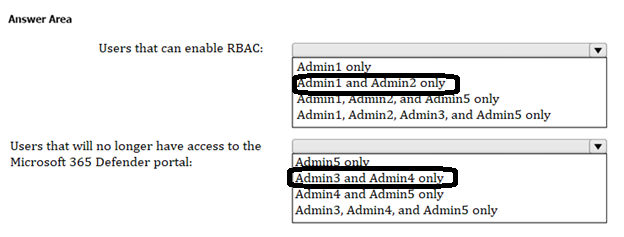
You need to enable role-based access control (RBAC) to restrict access to the Microsoft 365 Defender portal.
Which users can enable RBAC, and which users will no longer have access to the Microsoft 365 Defender portal after RBAC is enabled? To answer, select the appropriate options in the answer area.
NOTE: Each correct selection is worth one point.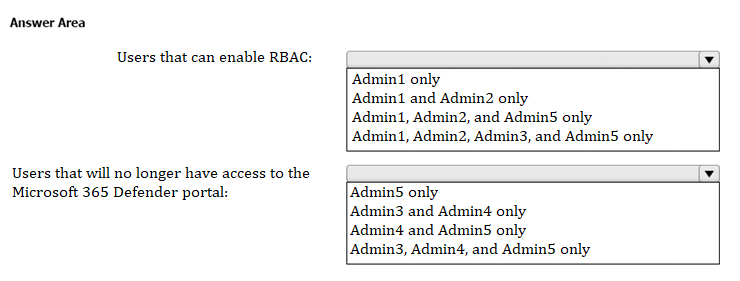
Correct Answer:
Your company has a Microsoft 365 E5 subscription.
You onboard a device on the company's network to Microsoft Defender for Endpoint.
In the Microsoft 365 Defender portal, you notice that the device inventory displays many devices that have an Onboarding status of Can be onboarded.
You need to ensure that onboarded devices are prevented from polling the network for device discovery but can still discover devices with which they communicate directly.
What should you configure in the Microsoft 365 Defender portal?
Correct Answer:
C
🗳️
HOTSPOT
-
You have a Microsoft 365 E5 subscription that uses Microsoft Intune and contains the devices shown in the following table.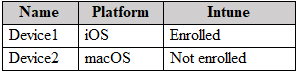
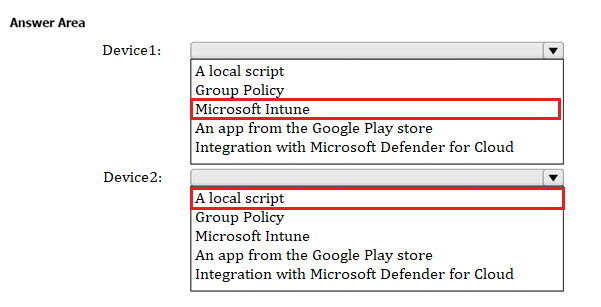
You need to onboard Device1 and Device2 to Microsoft Defender for Endpoint.
What should you use to onboard each device? To answer, select the appropriate options in the answer area.
NOTE: Each correct selection is worth one point.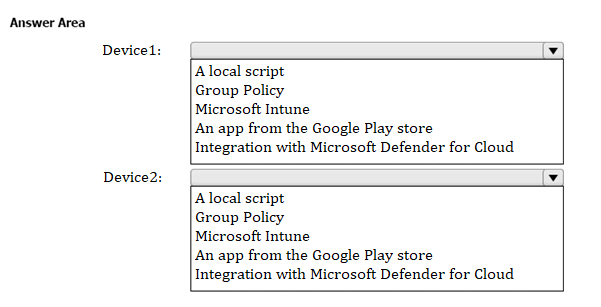
Correct Answer:
HOTSPOT
-
You have a Microsoft 365 subscription.
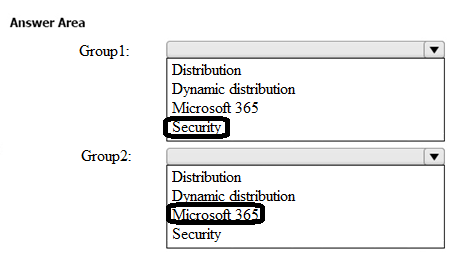
You need to create two groups named Group1 and Group2. The solution must meet the following requirements:
• Group1 must be mail-enabled and have an associated Microsoft SharePoint Online site.
• Group2 must support dynamic membership and role assignments but must NOT be mail-enabled.
Which types of groups should you create? To answer, select the appropriate options in the answer area.
NOTE: Each correct selection is worth one point.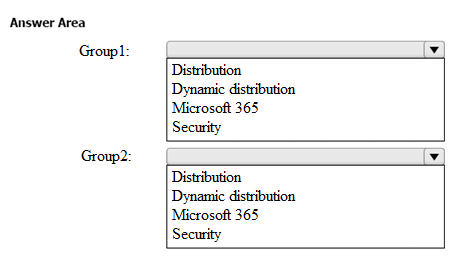
Correct Answer:
DRAG DROP
-
You have a Microsoft 365 subscription.
You need to meet the following requirements:
• Report a Microsoft 365 service issue.
• Request help on how to add a new user to an Azure AD tenant.
What should you use in the Microsoft 365 admin center? To answer, drag the appropriate features to the correct requirements. Each feature may be used once, more than once, or not at all. You may need to drag the split bar between panes or scroll to view content.
NOTE: Each correct selection is worth one point.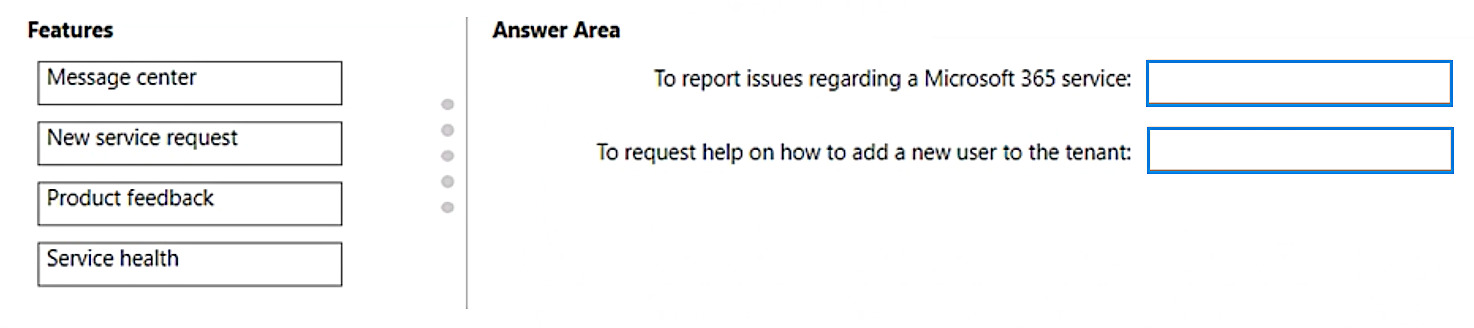
Correct Answer:

You have a Microsoft 365 E5 subscription that contains the groups shown in the following exhibit.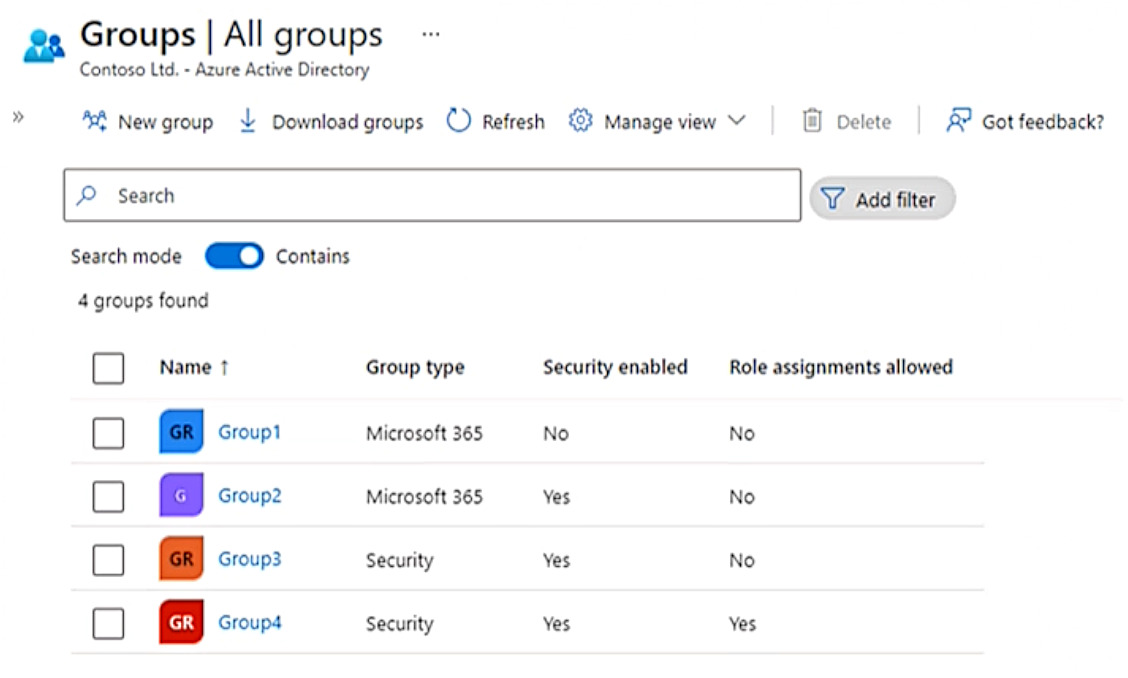
To which groups can you assign Microsoft 365 E5 licenses?
Correct Answer:
E
🗳️
HOTSPOT
-
You have a Microsoft 365 subscription.
From the Microsoft 365 admin center, you open the Microsoft 365 Apps usage report as shown in the following exhibit.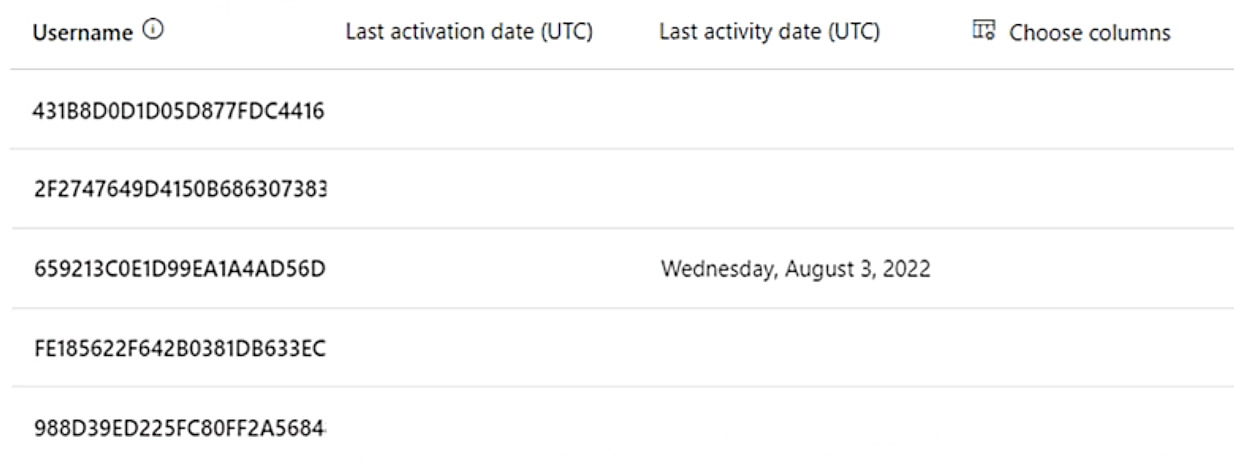
You need ensure that the report meets the following requirements:
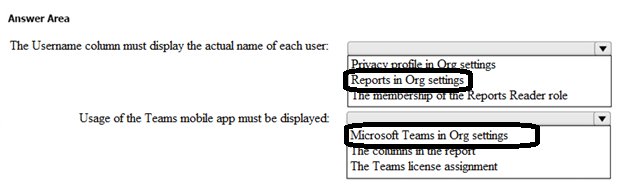
• The Username column must display the actual name of each user.
• Usage of the Microsoft Teams mobile app must be displayed.
What should you modify for each requirement? To answer, select the appropriate options in the answer area.
NOTE: Each correct selection is worth one point.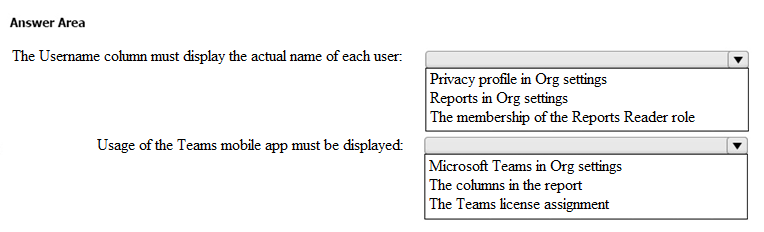
Correct Answer:
 Viewing page 13 out of 39 pages.

By buying Contributor Access for yourself, you will gain the following features:


 1 Month 2.58 / day
All Questions for 1 Exam
Inline Discussions
No Captcha / Robot Checks
Includes New Updates
1 Month 2.58 / day
All Questions for 1 Exam
Inline Discussions
No Captcha / Robot Checks
Includes New Updates
 3 Months 1.76 / day
All Questions for 1 Exam
Inline Discussions
No Captcha / Robot Checks
Includes New Updates
3 Months 1.76 / day
All Questions for 1 Exam
Inline Discussions
No Captcha / Robot Checks
Includes New Updates
