
HOTSPOT
-
You have a Microsoft 365 E5 subscription.
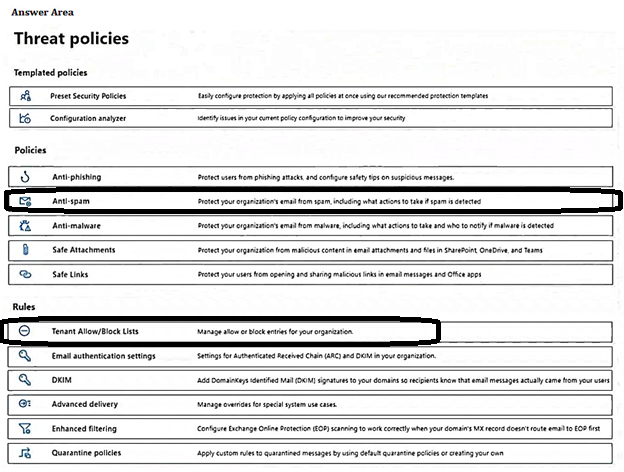
You need to configure threat protection for Microsoft 365 to meet the following requirements:
• Limit a user named User1 from sending more than 30 email messages per day.
• Prevent the delivery of a specific file based on the file hash.
Which two threat policies should you configure in Microsoft Defender for Office 365? To answer, select the appropriate threat policies in the answer area.
NOTE: Each correct selection is worth one point.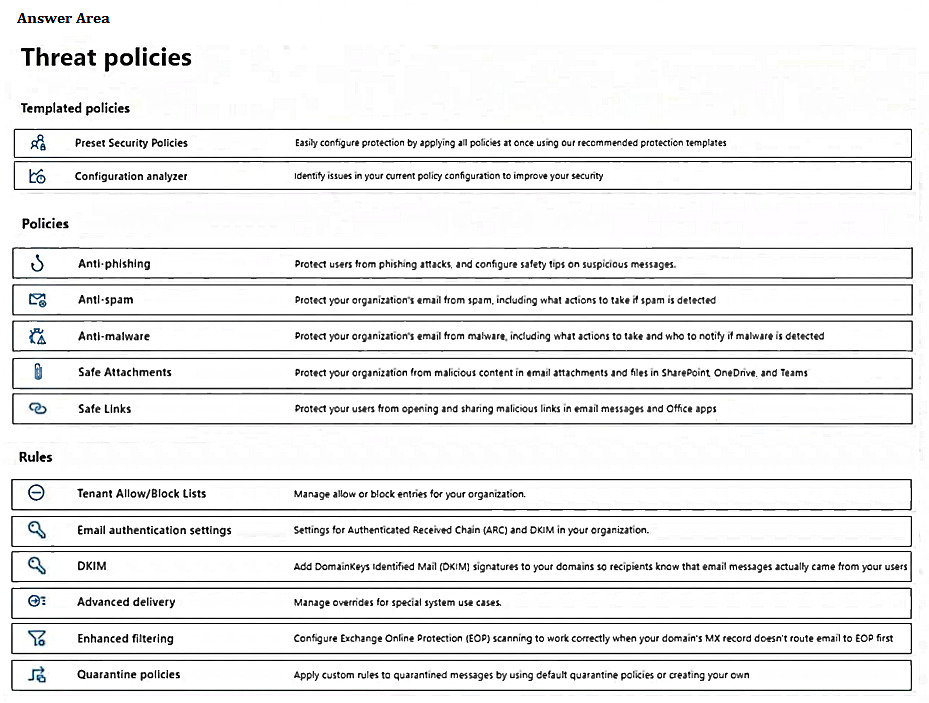
Correct Answer:
You have a Microsoft 365 subscription that uses Microsoft Defender for Office 365.
A Built-in protection preset security policy is applied to the subscription.
Which two policy types will be applied by the Built-in protection policy? Each correct answer presents a complete solution.
NOTE: Each correct selection is worth one point.
Correct Answer:
BC
🗳️
HOTSPOT
-
You have a Microsoft 365 E5 subscription that contains the users shown in the following table.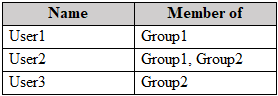
The subscription has the following two anti-spam policies:
• Name: AntiSpam1
• Priority: 0
• Include these users, groups and domains
• Users: User3
• Groups: Group1
• Exclude these users, groups and domains
• Groups: Group2
• Message limits
• Set a daily message limit: 100
• Name: AntiSpam2
• Priority: 1
• Include these users, groups and domains
• Users: User1
• Groups: Group2
• Exclude these users, groups and domains
• Groups: Group3
• Message limits
• Set a daily message limit: 50
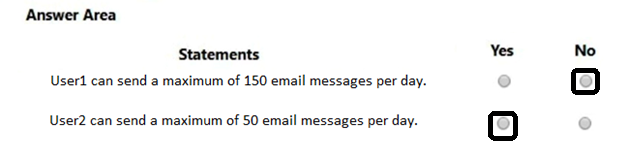
For each of the following statements, select Yes if the statement is true. Otherwise, select No.
NOTE: Each correct selection is worth one point.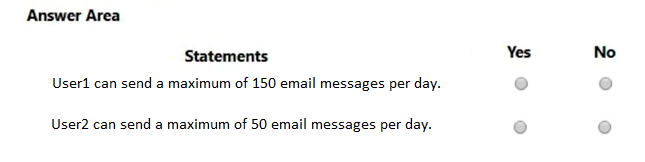
Correct Answer:
You have a Microsoft 365 E5 subscription that uses Microsoft Defender for Office 365.
You have the policies shown in the following table.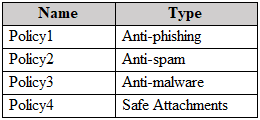
All the policies are configured to send malicious email messages to quarantine.
Which policies support a customized quarantine retention period?
Correct Answer:
A
🗳️
You have a Microsoft 365 E5 subscription.
Your company’s Microsoft Secure Score recommends the actions shown in the following exhibit.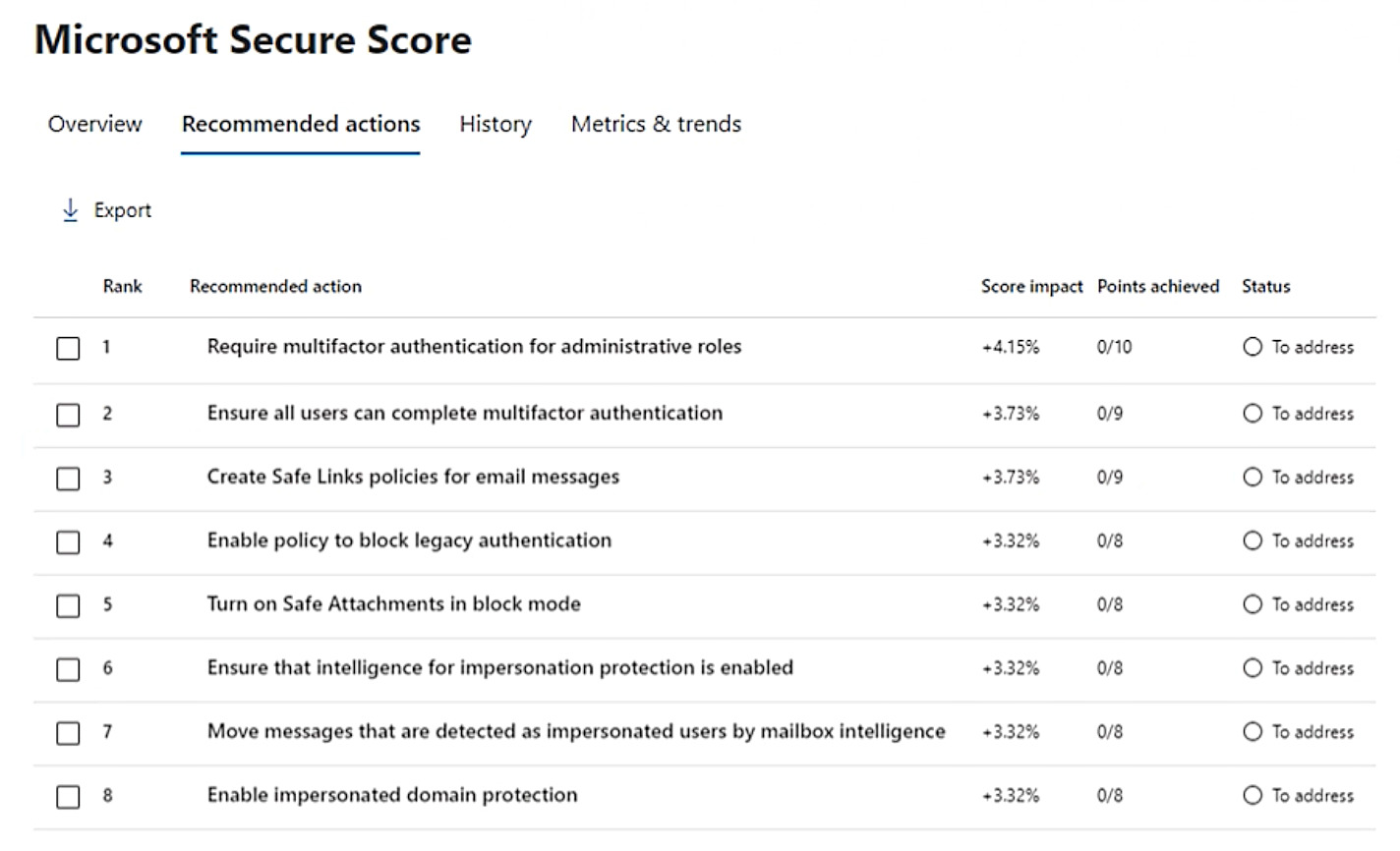
You select Create Safe Links policies for email messages and change Status to Risk accepted in the Status & action plan settings.
How does the change affect the Secure Score?
Correct Answer:
A
🗳️
DRAG DROP
-
You have a Microsoft 365 E5 subscription that contains the devices shown in the following table.
You need to onboard the devices to Microsoft Defender for Endpoint. The solution must minimize administrative effort.
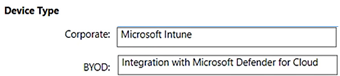
What should you use to onboard each type of device? To answer, drag the appropriate onboarding methods to the correct device types. Each onboarding method may be used once, more than once, or not at all. You may need to drag the split bar between panes or scroll to view content.
NOTE: Each correct selection is worth one point.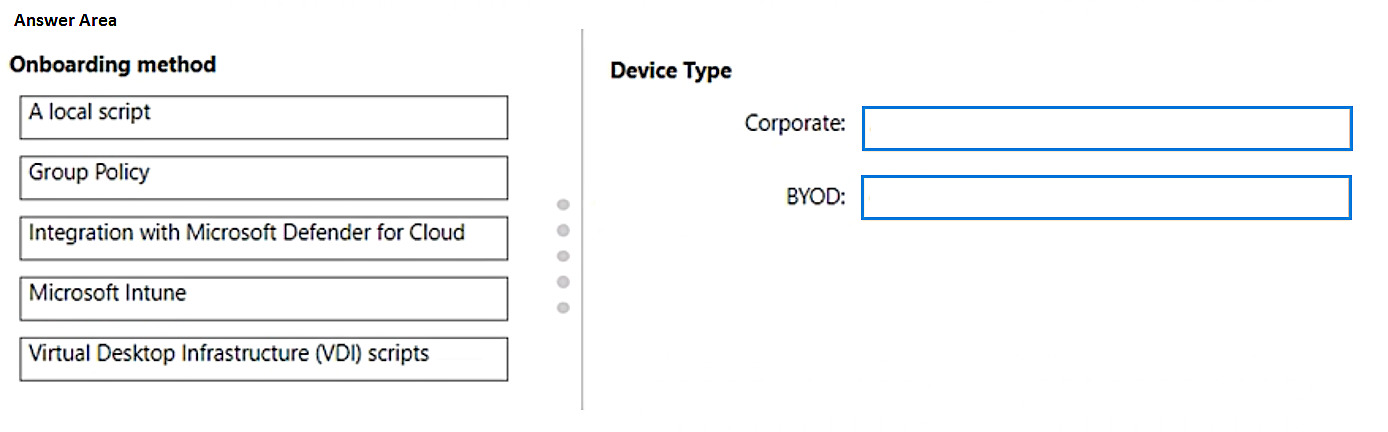
Correct Answer:
You have a Microsoft 365 E5 subscription.
You onboard all devices to Microsoft Defender for Endpoint.
You need to use Defender for Endpoint to block access to a malicious website at www.contoso.com.
Which two actions should you perform? Each correct answer presents part of the solution.
NOTE: Each correct answer is worth one point.
Correct Answer:
BD
🗳️
HOTSPOT
-
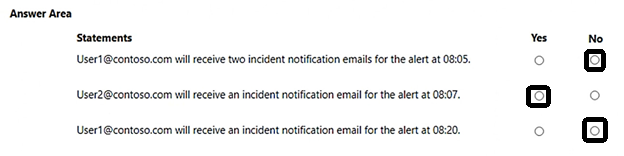
You have a Microsoft 365 E5 subscription that contains the devices shown in the following table.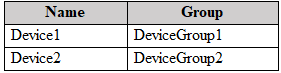
At 08:00, you create an incident notification rule that has the following configurations:
• Name: Notification1
• Notification settings
• Notify on alert severity: Low
• Device group scope: All (3)
• Details: First notification per incident
• Recipients: User1@contoso.com, User2@contoso.com
At 08:02, you create an incident notification rule that has the following configurations:
• Name: Notification2
• Notification settings
• Notify on alert severity: Low, Medium
• Device group scope: DeviceGroup1, DeviceGroup2
• Recipients: User1@contoso.com
In Microsoft 365 Defender, alerts are logged as shown in the following table.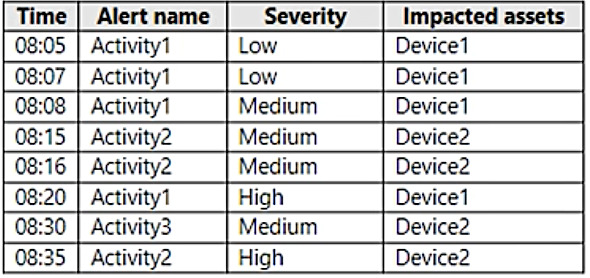
For each of the following statements, select Yes if the statement is true. Otherwise, select No.
NOTE: Each correct selection is worth one point.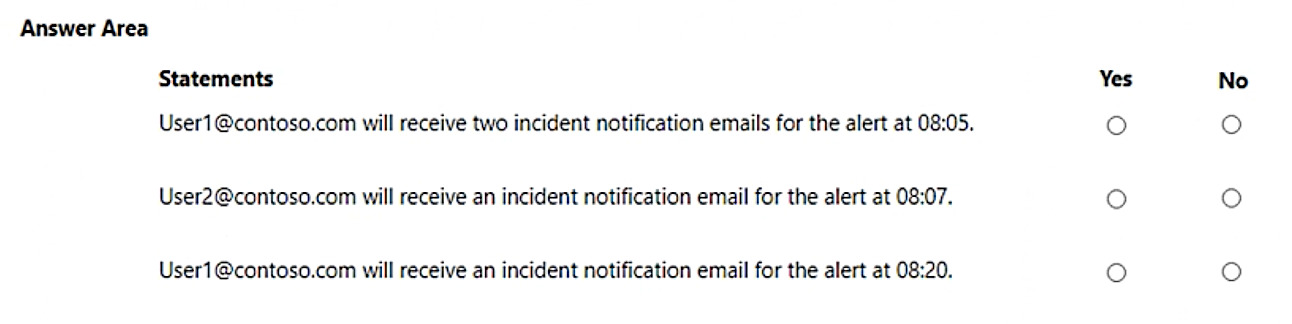
Correct Answer:
HOTSPOT
-
You have Microsoft 365 subscription.
You create an alert policy as shown in the following exhibit.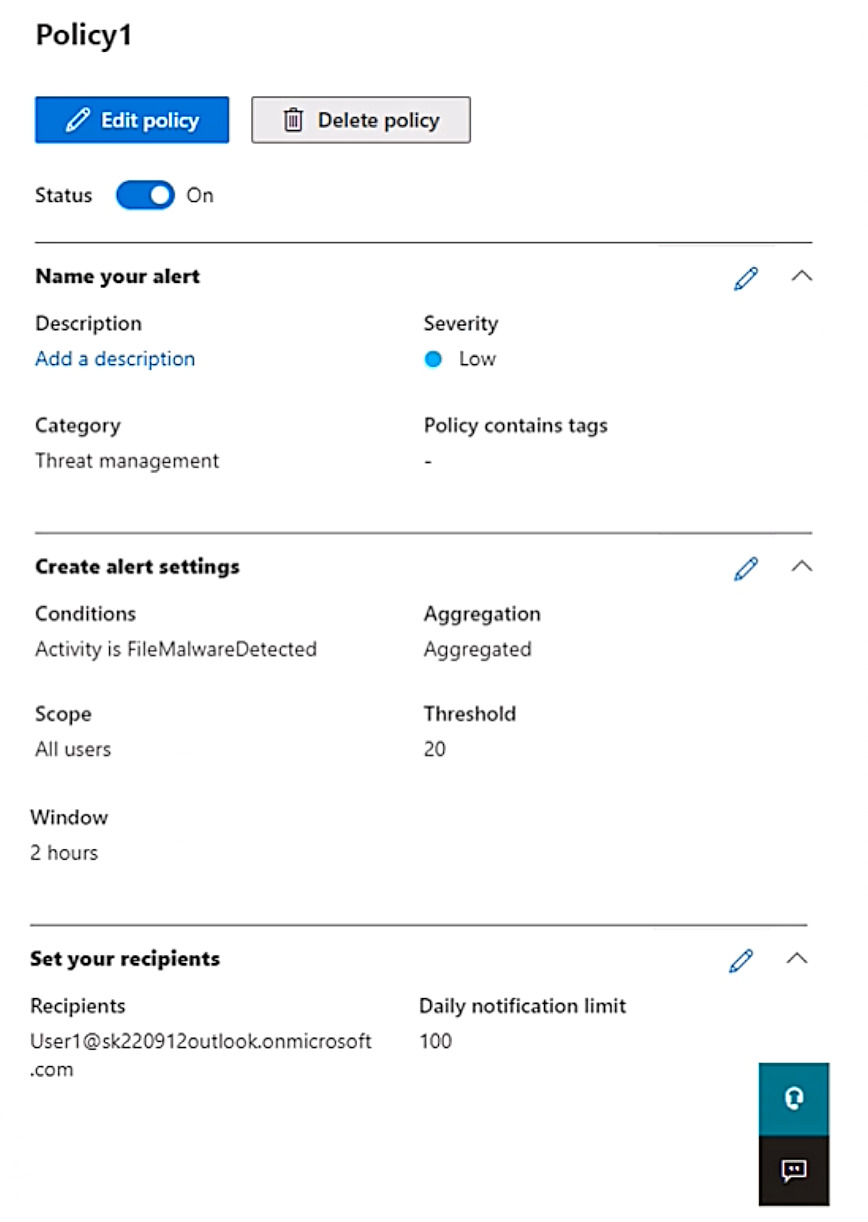
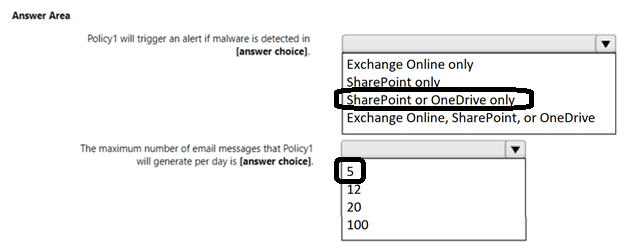
Use the drop-down menus to select the answer choice that completes each statement based on the information presented in the graphic.
NOTE: Each correct selection is worth one point.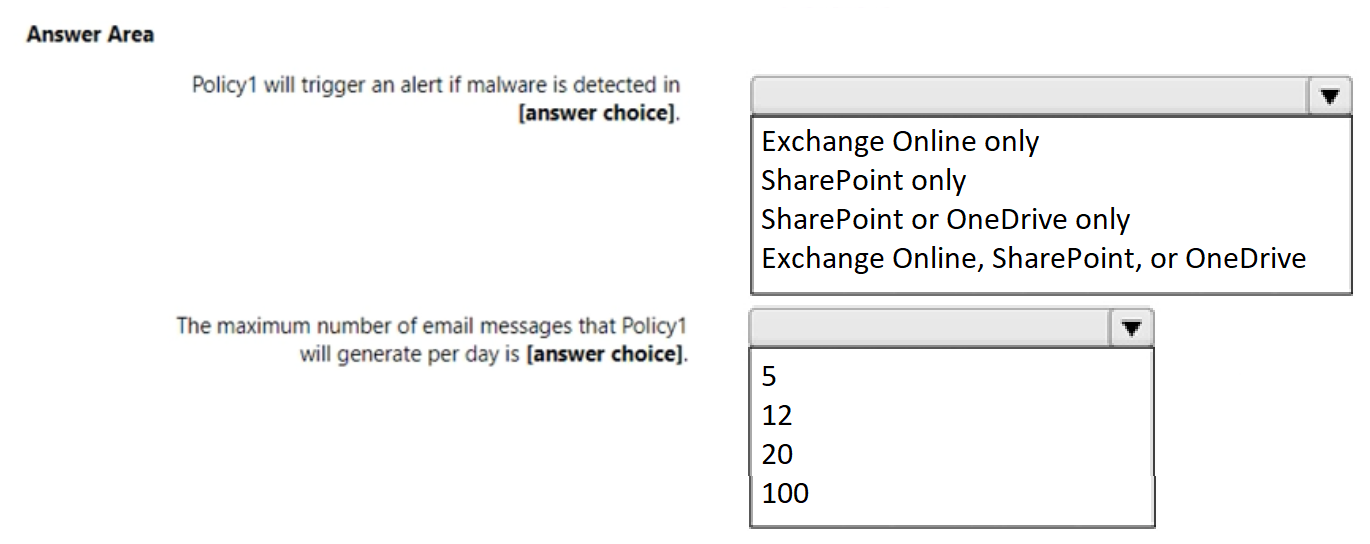
Correct Answer:
You have a Microsoft 365 E5 tenant.
You need to create a policy that will trigger an alert when unusual Microsoft Office 365 usage patterns are detected.
What should you use to create the policy?
Correct Answer:
D
🗳️
 Viewing page 19 out of 39 pages.

By buying Contributor Access for yourself, you will gain the following features:


 1 Month 2.58 / day
All Questions for 1 Exam
Inline Discussions
No Captcha / Robot Checks
Includes New Updates
1 Month 2.58 / day
All Questions for 1 Exam
Inline Discussions
No Captcha / Robot Checks
Includes New Updates
 3 Months 1.76 / day
All Questions for 1 Exam
Inline Discussions
No Captcha / Robot Checks
Includes New Updates
3 Months 1.76 / day
All Questions for 1 Exam
Inline Discussions
No Captcha / Robot Checks
Includes New Updates
